
Free Visual Schedule Builder for Therapy: Interactive Builder + Step-by-Step Guide

Visual Schedule Builder
Create a personalized visual schedule directly below. Choose pictures, arrange the steps, edit labels and time cues, then save your finished schedule as a PDF or JPEG.
For the best experience on a smaller screen, you can also open the Visual Schedule Builder in a new tab.
Therapist Guide
Introduction
Visual schedules are among the most evidence-based tools available for therapists working with children and adults who benefit from predictability and visual supports. Whether you are supporting clients with autism spectrum disorder, ADHD, anxiety, or acquired neurological conditions, visual schedules reduce uncertainty, build independence, and promote self-regulation.
The Visual Schedule Builder gives you a fast, clinician-friendly way to build individualized visual schedules using a rich library of picture-supported words, no graphic design skills required.
What You Will Learn in This Guide
- What visual schedules are and why they work
- How the Visual Schedule Builder supports schedule creation
- Step-by-step instructions with screenshots
- Two ready-to-use example schedules with clinical rationale
- Tips for customizing, printing, and sharing with families
1. What Are Visual Schedules?
A visual schedule is a sequence of images, symbols, or words representing the steps of a routine in order. Instead of relying on verbal instructions or memory, clients can look at the schedule to know what is happening now, what is next, and when they are done.
Why They Work
The brain processes visual information more efficiently than verbal information alone, especially for clients with autism, communication differences, executive function challenges, or anxiety. Key evidence-based benefits include:
- Reduced anxiety by making transitions and expectations predictable
- Greater independence: clients can self-manage steps without adult prompting
- Better compliance and cooperation with routines
- Support for working memory: external visual cues replace internal effort
- Improved communication for clients who find verbal instructions hard to process
2. What Is the Visual Schedule Builder?
The Visual Schedule Builder is a simple, browser-based tool for clinicians and educators to create individualized visual schedules using a searchable library of picture symbols. Its clean layout makes it practical for busy clinicians to build clear, professional-looking schedules in minutes.
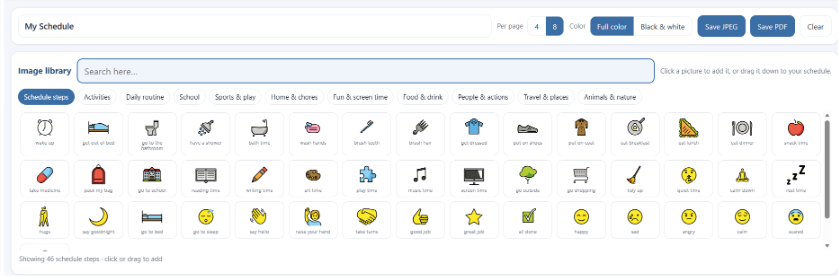
The Visual Schedule Builder: toolbar, image library, and schedule board
Key Features for Visual Schedules
| Feature | How It Helps |
|---|---|
| Image library | A searchable library of clear picture symbols for everyday activities, routines, food, people, and places. Type in the search box or tap a category to browse. |
| Category shortcuts | Eleven ready-made categories (Schedule steps, Activities, Daily routine, School, Sports & play, Home & chores, Fun & screen time, Food & drink, People & actions, Travel & places, Animals & nature) for quick access to common vocabulary. |
| Click or drag to add | Click a picture to drop it onto the schedule, or drag it down into place. Reorder steps at any time by dragging the cards. |
| Editable labels and time cues | Rename the label under each picture to match the client's own words, and add an optional time to any step from the Time dropdown (e.g. 7:30 AM). |
| Layout options | Choose First / Then for a simple two-step schedule, or choose 4 or 8 to control how many schedule items appear on each page. |
| Full color or black & white | Switch the whole schedule between Full color and Black & white for high-contrast use or low-ink printing. |
| Save and share | Save the finished schedule as a PDF or JPEG to print, email, or send home. |
3. Building a Visual Schedule: Step-by-Step
The process typically takes 10 to 20 minutes once you are familiar with the tool. Follow these steps each time you build a new schedule.

The toolbar: schedule title, layout, color mode, and Save buttons
| # | Action | Clinical Tip |
|---|---|---|
| 1 | Type a schedule title in the toolbar (e.g. 'Morning Routine'). | The title becomes the file name when you export, so include the client's initials. |
| 2 | List the steps you want to include before you start adding pictures. | Aim for 5 to 10 steps. Too many can overwhelm; too few may miss key transition points. |
| 3 | Find each picture: type an everyday word in the search box (e.g. 'brush teeth'), or tap a category. | Most morning and bedtime steps live under the Daily routine and Activities categories. |
| 4 | Add each picture by clicking it, or drag it down onto the schedule. | Add them in the order the routine happens; you can reorder afterward. |
| 5 | Drag the cards to arrange the steps in the right sequence. | Left-to-right or top-to-bottom mirrors reading direction and is intuitive for most users. |
| 6 | Edit the label under each picture to match the client's vocabulary. | Match the wording to the client's comprehension level. |
| 7 | Add a time to any step from the Time dropdown if you want time cues (e.g. 7:30 AM). | Time cues suit older or time-focused clients; leave them off for younger children. |
| 8 | Review the sequence with the client's goals in mind. Add a clear finish step if helpful. | Search star, good job, or celebrate for an 'all done' image at the end. |
| 9 | Save the schedule as a PDF or JPEG, then print or send it home. Use Clear to start fresh. | Print on card stock and laminate for durability; add velcro for a take-off format. |
4. Example Schedule: Morning Routine
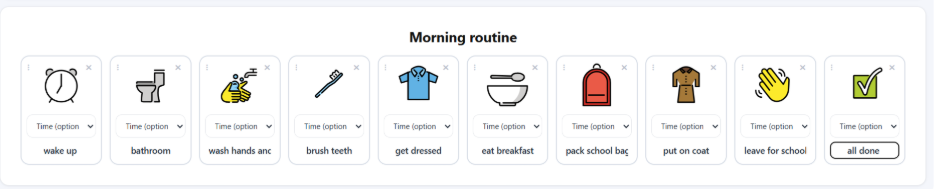
The morning routine is one of the most commonly requested schedules. A well-designed morning schedule reduces conflict, supports task initiation, and builds confidence for the day ahead.
Who Benefits
- Children and adolescents with autism spectrum disorder
- Children with ADHD who struggle with task initiation and sequencing
- Clients with acquired brain injury or cognitive difficulties affecting memory and planning
- Anxious children who need predictability to feel safe in their morning routine
Suggested Search Terms in the Visual Schedule Builder
wake up, alarm, toilet, shower, wash hands, brush teeth, get dressed, socks, shoes, breakfast, drink water, pack bag, coat, bus, school, wave, star
Most of these appear under the Daily routine and Activities categories. For a finish step, search star, good job, or celebrate.
| # | Activity | Why This Step Matters |
|---|---|---|
| 1 | Wake up / Alarm | Establishes a clear, consistent start signal. Removes ambiguity around waking. |
| 2 | Toilet | Addressing biological needs first reduces discomfort and distraction during later steps. |
| 3 | Shower / Wash face | Warm water aids arousal regulation and sensory activation. |
| 4 | Brush teeth | Logical grouping of bathroom tasks maintains routine order. |
| 5 | Get dressed | Completing personal care before eating reduces mess and reinforces sequence. |
| 6 | Breakfast | Provides nutrition and a motivating midpoint activity. |
| 7 | Pack school bag | Reduces panic or forgotten items at the door. |
| 8 | Shoes and coat | Physical cue that departure is imminent. |
| 9 | Say goodbye | Meaningful social script providing emotional closure for the home-to-school transition. |
| 10 | All done! | Marks completion and provides a sense of accomplishment. |
5. Example Schedule: Calming / Bedtime Routine
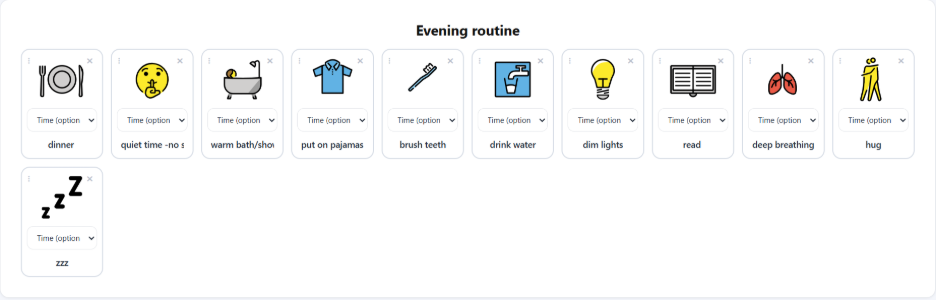
Clients with sensory processing differences, anxiety, or high arousal at the end of the day often struggle with the transition to sleep. A calming bedtime schedule provides predictability, sensory grounding, and sequencing support to reduce arousal and prepare the nervous system for rest.
Who Benefits
- Children with autism who have difficulty transitioning to sleep
- Clients with sensory processing differences who become over-aroused in the evening
- Children with anxiety who resist or ruminate at bedtime
- Clients with ADHD who have difficulty winding down after high-stimulation activities
- Adults with acquired neurological conditions affecting sleep-onset routines
Suggested Search Terms in the Visual Schedule Builder
mealtime, bath, brush teeth, drink water, quiet time, light, book, reading, yoga, hug, sleep, go to bed, moon, star
These sit mainly under Daily routine, People & actions, and Animals & nature. Relabel any picture to fit, for example label 'yoga' as 'deep breath'.
| # | Activity | Why This Step Matters |
|---|---|---|
| 1 | Finish dinner | Formally opens the evening wind-down. Signals the transition away from the day. |
| 2 | No screens / Quiet time | Blue light and stimulating content delay melatonin. Critical for clients with over-arousal profiles. |
| 3 | Warm bath or shower | Provides deep pressure and proprioceptive input, activating the parasympathetic nervous system. |
| 4 | Pajamas | Tactile shift to soft clothing is a physical cue that the sleep routine has begun. |
| 5 | Brush teeth | Completes hygiene and adds a calming oral sensory step. |
| 6 | Drink of water | Ensures hydration and reduces night waking. |
| 7 | Dim lights | Reduces visual stimulation and signals the brain to increase melatonin. |
| 8 | Story / Reading time | Quiet, predictable narrative structure supports co-regulation and emotional closeness. |
| 9 | Deep breath | Diaphragmatic breathing activates the vagus nerve, reducing heart rate and cortisol. |
| 10 | Hug / Goodnight | Affectionate farewell supports relational safety and reduces separation anxiety. |
| 11 | Lights off / Sleep | Clear, unambiguous endpoint reduces requests for 'one more thing.' |
6. Printing and Sharing Schedules
Printing Tips
- Save as a PDF for printing, or a JPEG to drop into an email or document
- The PDF exports at A4, so in your print dialog choose your paper size and 'Fit to page'
- Print on card stock (80 lb / 200 gsm or heavier) and laminate for durability
- Use a take-off format with velcro so completed steps can be physically removed
- Print full-size for strip schedules, or scale down for pocket cards
Sending Schedules Home
One of the most effective uses of the Visual Schedule Builder is enabling families to continue schedule use at home:
- Save the completed schedule as a PDF (or JPEG) using the Save buttons
- Send via your secure client communication platform or email
- Include a brief parent instruction note (template below)
- Follow up at the next session to check implementation and troubleshoot

Saving a finished schedule as a PDF or JPEG
Dear [Family name],
Attached is [Child's name]'s visual schedule for [morning routine / bedtime routine]. Print it and place it somewhere visible: on the bathroom mirror, fridge, or bedroom door.
How to use it:
- Each morning or evening, point to the first picture together.
- When [Child's name] completes a step, check it off or point to the next one.
- Celebrate when you reach 'All done!'
Consistency matters more than perfection. Please bring any questions to our next session.
Warm regards, [Therapist name]
7. Adapting Schedules for Different Clients
| Client Profile | Adaptations in the Visual Schedule Builder |
|---|---|
| Young children (3-5 yrs) | Use the First / Then strip layout with just a few steps, simple labels or none, and Full color images. Limit to 4 to 6 steps. |
| Autism: higher support needs | Choose the clearest, most concrete symbols and keep the step count low. Use First / Then strip to show only now and next, and a take-off (velcro) print. |
| Autism: lower support needs | Add written labels and time stamps from the Time dropdown. Let the client help build the schedule. Add choice steps (e.g. 'Breakfast: cereal OR toast'). |
| ADHD | Keep schedules short and visually clean. Pair with a timer. Highlight the reward step at the end. |
| Anxiety | Add a feelings step and a coping action; relabel a calm image as 'deep breath' or 'quiet time'. Use warm, reassuring labels. |
| Acquired brain injury | Add time stamps and keep the same symbols and sequence across sessions. Avoid rearranging steps. |
| Adults | Use clear labels with discreet symbols, and try Black & white for a more understated look. Frame it as a 'routine card' or 'daily plan'. |
8. Tips for Successful Implementation
In the Clinic
- Introduce the schedule during a calm moment, not mid-transition
- Walk through each step together before independent use
- Use the schedule yourself during therapy to model its use
- Celebrate even partial use, it is progress
At Home
- Involve parents and caregivers in the design process
- Place the schedule in a consistent, visible location
- Regularly review and retire steps that have become automatic
- Remind families: consistency matters more than perfection
Reviewing and Fading the Schedule
At each session, check: Is the client following the schedule? Are there problem steps? As independence grows, reduce the number of steps or transition from full images to text only. The goal is for the routine to become internalized: the schedule fades when the client no longer needs the external support. Celebrate this: it means the intervention worked.
Quick Reference: Visual Schedule Builder Checklist
Use this checklist each time you create a new visual schedule.
- Identify the routine and the client's specific needs
- Type a schedule title that includes the client's initials
- List the steps in sequence before you start adding pictures
- Search the image library, or tap a category, for each step
- Click or drag each picture onto the schedule
- Drag the cards into the right order
- Edit the labels to match the client's vocabulary and comprehension
- Add time cues from the Time dropdown if needed
- Choose a layout and color mode
- Add a clear finish step (e.g. a star)
- Review the sequence for missing transitions or ambiguous steps
- Save as PDF or JPEG, print on card stock, and laminate for physical use
- Prepare a brief parent instruction note and introduce it to the client and caregiver
- Schedule a review at the next session
About This Resource
This guide was developed to support therapists integrating the Visual Schedule Builder into evidence-based visual schedule practice. It is intended for use by qualified speech-language pathologists, occupational therapists, psychologists, behavior support practitioners, and allied health assistants working under supervision. Content should be adapted to individual client needs and used alongside clinical reasoning and professional judgment.
The Visual Schedule Builder is an independent tool and does not represent the content available on the Cognishine platform.
