
Using a Digital Whiteboard Across Therapy Disciplines

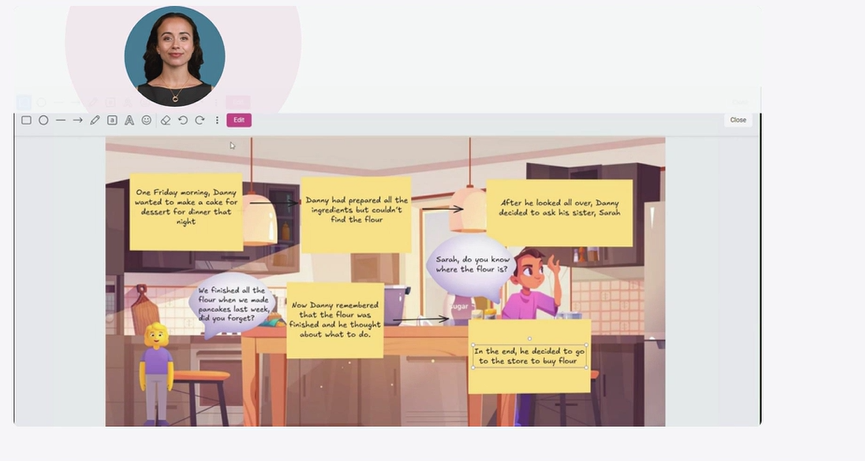
Digital whiteboards are a flexible, engaging tool within a digital intervention platform that can be adapted across therapy disciplines to support functional, meaningful intervention. Platforms like Cognishine provide therapists with evidence-based therapy activities and multidisciplinary therapy resources, helping transform simple digital tasks into real-life, patient-centered therapy experiences. With the addition of a background image such as a classroom, kitchen, office, bedroom, playground, supermarket, or street scene, therapists can transform simple digital tasks into activities that reflect real-life environments and everyday participation.
For Occupational Therapists, digital whiteboards can support graphomotor, visual–motor, and functional computer-related goals. For Speech-Language Pathologists, the same format can be used to target communication, language, speech, and cognitive-communication skills. In both cases, the whiteboard offers a visually supported, interactive space that can be easily graded for different ages, diagnoses, and therapy settings.
In this video, Whiteboard Tutorial Guide, you will find practical ideas for using the whiteboard in your sessions.
To expand on these ideas, the sections below highlight additional ways digital whiteboards can be used in both Occupational Therapy and Speech-Language Pathology practice.
Using a Digital Whiteboard for OT Graphomotor and Visual–Motor Skills
Digital whiteboards are a simple yet powerful tool within occupational therapy resources and cognitive rehabilitation tools. By adding a background picture (for example, a classroom, kitchen, office or street scene), a basic tracing or writing task becomes a functional, motivating activity that targets multiple skills at once in a meaningful context. All activities can be completed using a finger, mouse, or any access method supported by the program, making the platform fully device-agnostic and adaptable to individual needs.
Using a Finger on the Whiteboard
When clients trace or write with a finger on a touch screen, you can address:
- Fine motor control: finger isolation, graded pressure, and endurance.
- Pre-writing strokes and letter formation: lines, circles, diagonals, simple letters and numbers.
- Tactile and proprioceptive feedback: awareness of where the hand is in space and how it moves.
- Visual–motor integration: coordinating what the eyes see with what the hand does (for example, staying on a path or inside a shape).
These foundational skills support functional participation, school readiness, and daily communication tasks.
Using a Mouse or Trackpad
Mouse (or trackpad) tasks are especially useful for older students and adults, including return-to-work goals:
- Precision grip and wrist control while holding and moving the mouse.
- Hand–eye coordination and motor planning when the cursor is separate from the hand.
- Visual tracking while following the cursor across the screen.
- Functional computer skills: clicking, double-clicking, dragging, dropping, and scrolling.
Because the hand does not directly touch the target, mouse work naturally increases planning, problem solving, and error correction demands, which supports motor learning and generalization.
Skills You Can Target with a Background Scene
A background image creates a realistic therapy environment that you can adapt to many OT goals. For example, a classroom scene can be used to work on:
- Visual scanning: “Find all the pencils/books.”
- Figure–ground: “Circle the scissors on the busy desk.”
- Visual discrimination: “Find the ruler, not the pencil.”
- Spatial relations/position in space: “Mark the object under the table, next to the window, behind the chair.”
- Visual attention: staying focused in a cluttered, realistic scene.
These skills support handwriting, reading, copying from the board, navigating busy spaces, and functional participation at school, work, and in the community.
Practical OT Activity Ideas With a Classroom Scene
All of these activities can be done using either a finger (for more direct tactile feedback) or a mouse (for greater motor planning demand):
Find and circle
- Prompt: “Circle all the notebooks you see.”
- Skills: scanning, figure–ground, fine motor or cursor control, visual–motor integration.
Draw a path
- Prompt: “Draw a line from the door to the teacher’s desk without crossing over any chairs.”
- Skills: visual tracking, motor planning, line control, spatial planning.
Follow directions
- Prompt: “Put an X on the backpack, then underline the pencil, then circle the chair.”
- Skills: sequencing, working memory, attention, following multi-step directions, motor control.
Copy and write
- Prompt: “Write the first letter of each item you find (D for desk, C for chair, B for board).”
- Skills: letter recall, letter formation, spacing, visual–motor integration.
You can easily substitute other background images (kitchen, office, supermarket, street crossing, bedroom) to match goals such as safety awareness, IADLs, or community participation.
Across Ages, Settings, and Diagnoses
This whiteboard framework can be adapted across the age spectrum and in many OT practice settings:
- Children: school-based OT, early intervention, clinic. Scenes can support pre-writing, early handwriting, classroom routines, and basic visual–perceptual skills.
- Adolescents and adults: outpatient rehab, day programs, mental health, return-to-work. Scenes like offices, public transport, or shops can target computer use, executive functioning, and complex visual–motor tasks.
- Older adults: inpatient rehab, SNFs, home health, community programs. Scenes such as kitchens, bathrooms, supermarkets, or streets can support visual scanning, safety, problem solving, and independence in daily tasks.
The same structure works with a wide range of diagnoses, including developmental coordination disorder, learning disabilities, autism, stroke, brain injury, Parkinson’s disease, orthopedic conditions, and general deconditioning. By adjusting the complexity of the picture, the number of targets, whether the client uses a finger or mouse, and how many steps are in each direction, the activity can be graded from very simple to highly complex.
Brief Research Rationale (For a Professional OT Audience)
- Motor learning literature supports repetitive, task-specific practice in meaningful contexts for better skill acquisition and carryover, which aligns with using realistic, scene-based tasks rather than isolated drills.
- Handwriting and visual–motor research links fine motor control, visual–motor integration, and visual perception with handwriting performance and functional participation in school, work, and daily life.
- Studies of interactive and technology-based rehabilitation show that digital, visually rich tasks can enhance upper-extremity control and engagement, supporting the use of digital whiteboards as part of contemporary OT practice.
Using a Digital Whiteboard for SLP Communication, Language, and Speech Goals
Digital whiteboards are a simple, flexible tool for Speech-Language Pathology intervention. By adding a background picture (for example, a classroom, kitchen, playground, office, supermarket, bedroom, or street scene), a basic speech or language task becomes a functional, motivating activity that targets multiple skills at once in a meaningful context.
Visual scenes help move therapy beyond isolated picture cards or drills. Instead, clients can practice understanding, expressing, and using language in contexts that are closer to everyday life.
Why Visual Scene-Based Whiteboard Activities Matter
Using a background scene on the whiteboard helps create structured but realistic communication opportunities. Clients can point, circle, mark, label, write, or describe directly on the image while working on speech, language, or cognitive-communication goals.
This format can support:
- Receptive language: understanding vocabulary, concepts, and directions
- Expressive language: naming, describing, sentence formulation, and storytelling
- Speech sound practice: finding and producing target words in context
- Cognitive-communication: attention, memory, sequencing, and problem solving
- Social communication: interpreting situations, people, and everyday interactions
Because the image stays visible throughout the task, it provides ongoing visual support and helps clients organize their responses more easily.
Skills You Can Target With a Background Scene
A background image creates a realistic therapy environment that you can adapt to many SLP goals. For example, a classroom scene can be used to work on:
- Vocabulary development: “Name the items you see on the desk.”
- Following directions: “Circle the pencil under the chair.”
- WH-questions: “Who is in the classroom?” “What are they doing?” “Where is the backpack?”
- Describing and sentence formulation: “Tell me what you see in a full sentence.”
- Speech sound practice: “Find three things that have the /s/ sound.”
- Narrative language: “Tell a story about what happened before class started.”
- Inferencing and reasoning: “Why is the student standing by the board?” / “What might happen next?”
These skills support functional communication in the classroom, at home, in the community, and at work.
Practical SLP Activity Ideas With a Classroom Scene
You can use the same background image in many different ways depending on the client’s goals:
Find and name
- Prompt: “Find and name three things used for writing”
- Skills: vocabulary, categorization, word retrieval, expressive language
Follow directions
- Prompt: “Circle the notebook on the table, then underline the chair by the window.”
- Skills: auditory comprehension, attention, spatial concepts, working memory
Describe the scene
- Prompt: “Tell me what is happening in this classroom.”
- Skills: sentence formulation, grammar, vocabulary, narrative language
Ask and answer questions
- Prompt: “Who is sitting?” “What is on the desk?” “Where is the bag?”
- Skills: WH-question comprehension, expressive language, attention to detail
Speech sound search
- Prompt: “Find objects that start with /b/” or “Name everything you see with the /s/ sound.”
- Skills: articulation, phonological awareness, speech sound generalization
Story building
- Prompt: “Make up a story about this classroom.”
- Skills: sequencing, inferencing, narrative structure, expressive language
Problem solving
- Prompt: “What looks out of place?” or “What should the student do first?”
- Skills: reasoning, executive functioning, functional communication
You can easily substitute other background images (kitchen, supermarket, office, playground, street crossing, bedroom) to match goals such as daily routines, community participation, safety, or social communication.
Across Ages, Settings, and Diagnoses
This whiteboard framework can be adapted across the age spectrum and in many SLP practice settings:
- Children: early language, speech sound development, following directions, vocabulary, and storytelling
- School-age students: classroom language, describing, inferencing, narrative skills, and articulation carryover
- Adolescents and adults: word retrieval, cognitive-communication, social communication, and functional language
- Older adults: aphasia, cognitive-communication, sequencing, safety, and daily communication
The same structure works with a wide range of diagnoses, including developmental language disorder, speech sound disorders, autism, aphasia, brain injury, dysarthria, apraxia of speech, cognitive-communication disorders, and neurodegenerative conditions. By adjusting the complexity of the picture, the number of targets, the length of directions, the language level expected, and the amount of support provided, the activity can be graded from very simple to highly complex.
Clinical Rationale
Language and communication skills are often more effective to practice in meaningful contexts than in isolated drills alone. Scene-based whiteboard activities support this by embedding speech and language targets into realistic, visually supported environments.
Research and clinical practice support the use of visual supports, contextualized language tasks, and functional communication activities to improve engagement, comprehension, and carryover. Digital whiteboards offer a practical way to combine these elements in a flexible format that can be adapted to different ages, settings, and goals.
Bringing It All Together
One of the greatest strengths of the digital whiteboard within the Cognishine platform is its interdisciplinary versatility. The same background scene can be used in different ways by different professionals, each targeting their own goals while still keeping the activity functional, meaningful, and engaging.
A classroom image, for example, might be used by an OT to address visual scanning, motor planning, and handwriting-related skills, while an SLP might use that same scene to target vocabulary, following directions, narrative language, or speech sound practice. At the same time, a teacher may use it for classroom concepts, literacy, or comprehension tasks; a tutor may use it for language enrichment, reading, or sequencing; and an activity coordinator may use it to support participation, conversation, attention, and cognitive engagement in group or individual activities.
This flexibility makes digital whiteboards especially valuable across interdisciplinary and educational settings, where shared materials can be adapted for different ages, needs, and professional perspectives.
Used thoughtfully, digital whiteboards can help bridge skill development with real-world participation. They offer a practical way to create activities that are adaptable, motivating, and relevant to everyday life across therapy, education, and community-based settings.
About the authors
Elaine Wiener, OTR/L, is a pediatric occupational therapist with over 25 years of experience working in school-based settings with children in preschool and elementary school, as well as experience with the early intervention population. She currently serves as the U.S. Website Manager and Clinical Business Development Manager at Cognishine, developing practical, accessible resources for families, therapists, and educators.
Alona Novak is a Portugal-based speech and language therapist at Cognishine and a practicing clinician in stroke rehabilitation, working across aphasia, apraxia of speech, and dysarthria. She also works with voice disorders and provides therapy in Hebrew and Russian.
